FMX is Officially Live!
The wait is over. FMX is now available to the public (on both Windows and iPad)! 🎉
FMX is Foto Master’s next-generation photo booth software, built to make events faster to set up, easier to manage, and more flexible to customize, without losing the power professionals rely on.
It has been tested, refined, and shaped with real booth owners over the past months. Now, it’s ready for real production use.
This post covers what FMX is, what’s new, and how to start today.

What Is FMX?
FMX is Foto Master’s cloud-connected photo booth software,
available in two versions:
• FMX for Windows
• FMX for iPad
Both are built around one simple idea:
You should be able to build and manage events remotely, from any browser, with one-click syncing to the booth.
With FMX, you can:
✅ Build experiences in Foto Master Cloud
✅ Sync changes to the booth in seconds
✅ Run modern workflows, layouts, and video outputs
✅ Offer premium experiences, including AI-powered transformations
The result is less setup time, fewer on-site changes, and smoother event days!

The FMX Workflow: Select → Sync → Play
FMX is designed to remove friction from day-to-day events.
☁️ Select
Choose a ready-to-run preset inside Foto Master Cloud.
Each preset already includes workflow logic, layouts, animations, and outputs.
🔄 Sync
Open FMX on your booth and sync the event.
All assets and settings download automatically.
▶️ Play
Press Start Photo Booth.
Your experience is live and ready for guests.
No manual file handling. No rebuilding. No missing assets.
See it in action:

Cloud Editors: Build the Whole Experience Online
Foto Master Cloud is the cockpit behind FMX. It includes three main editors that define the full guest experience:
-
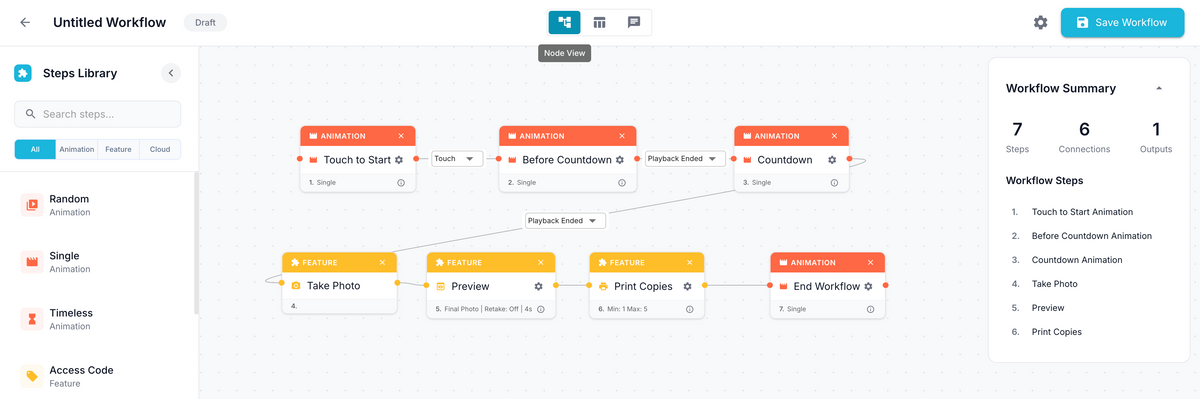
Workflow Builder
Controls the guest journey and logic, including branching, features, selection screens, AI steps, sharing, and more.

-
Layout Builder
A visual editor to design print layouts and overlays exactly how you want.

-
Video Builder
Edit video outputs with effects, start and end screens, overlays, filters, and AI, all in one place.

Everything is managed remotely, then synced to the booth with one click.
Simple to Start. Powerful When You Need It.
FMX doesn’t remove capabilities. It organizes them better.
You still get:
✔ Premium Foto Master performance
✔ Full branding and customization
✔ Advanced workflows and logic
✔ Support for complex, multi-step experiences
And now it’s easier to build in the way you prefer.
Inside the Workflow Builder you can switch between:
-
List Mode (simple, linear, familiar)

-
Node View (visual, powerful, easy to understand, infinite canvas)
-
AI Chat View (build workflows from a prompt in seconds)
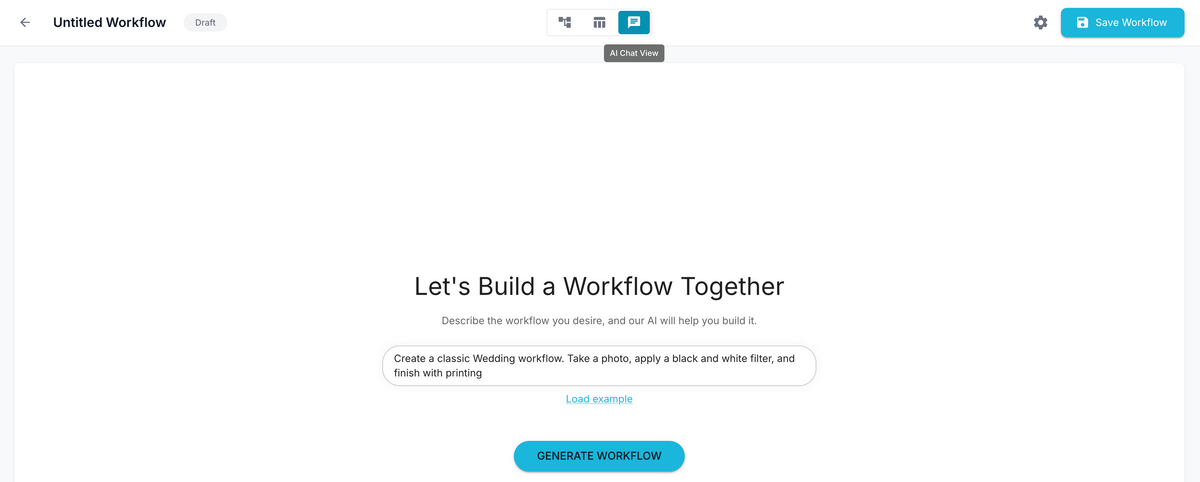

Templates are always available too, so you can start with a proven preset and tweak from there.
A Smarter, Leaner Booth Software
While FMX is powered by the Cloud, the software running locally on your booth has been completely redesigned from the ground up.
FMX for Windows
- Clean, modern UI for faster setup and operation
- Optimized performance with smoother animations and AI processing
- Plug & Play device detection for cameras, printers, LED rings and other devices
- Live camera view with test shots and instant adjustments
- Global Settings for one-time hardware setup

FMX for iPad
- Lightweight, responsive app built for touch-first operation
- Minimal on-device setup, with most work done remotely in the Cloud
-
Fast syncing and reliable on-site performance

Remote control meets on-site stability. Once your event is synced, FMX runs independently and reliably.
Built for What’s Next
FMX is the foundation for everything we're releasing going forward.
☁️ Cloud connectivity
- Remote editing from any browser
- Real-time syncing to one or many booths
- Centralized asset and event management
- Licenses and device management
- Live analytics and activity tracking
🪄 Creative AI tools
- AI Layout Creator and AI Animation Creator for creative customization
- AI Workflow Builder to generate complete event flows from a description
Instead of just selling "AI tools," FMX delivers real, consistent results through ready-to-run, high-end presets that you can deploy instantly.
What FMX Means for Existing Customers
If you already use Foto Master software, FMX is the natural next step.
✅ Your existing licenses are honored
✅ Your hardware stays the same
✅ Your workflow becomes easier
There are two simple paths:
1. If you use FMBooth (and have a Cloud plan)
You can download FMX and start using it right away. It is included in your current plan!
2. If you use older versions and without a Cloud plan
FMX is powered by Foto Master Cloud, so you will need to subscribe to a Cloud plan to unlock it.
Good News: We honor your lifetime license! You do not pay per-device software fees for FMX. You only need one Cloud account for your entire company to cover all your booths.
Getting Started with FMX
We are here to help you make the switch. Our support team is available to guide you through the setup and answer any questions you might have.
- Log in or sign up to Foto Master Cloud
- Download and install FMX for Windows
- Create your first event in Foto Master Cloud
- Sync and run your experience


📘 Visit the Knowledge Base for step-by-step guides
FMX Is Just the Beginning
FMX represents a shift toward simpler setups, smarter tools, and more creative freedom - on both Windows and iPad.
We’re excited to what you create with it.