AI Can Now Edit Your FMX Workflows
The AI Workflow Builder in FMX can now edit your workflows. ✨
Until now, it could only build a new workflow from scratch. Now you can open any template or workflow you already have, describe the change, and the AI updates it for you. It also understands your requests much better, so you get the result you meant on the first try more often.
Create
💬 Describe the experience, and the AI builds it.
Open the Workflow Builder in Foto Master Cloud and switch to AI Chat View. Describe what you want in plain words, then click Generate Workflow.
The AI builds the whole workflow with every step connected, using the same steps you see in the Steps Library. Nothing is hidden, so you can open any step and adjust its settings.

Edit
✏️ Change any workflow by asking.
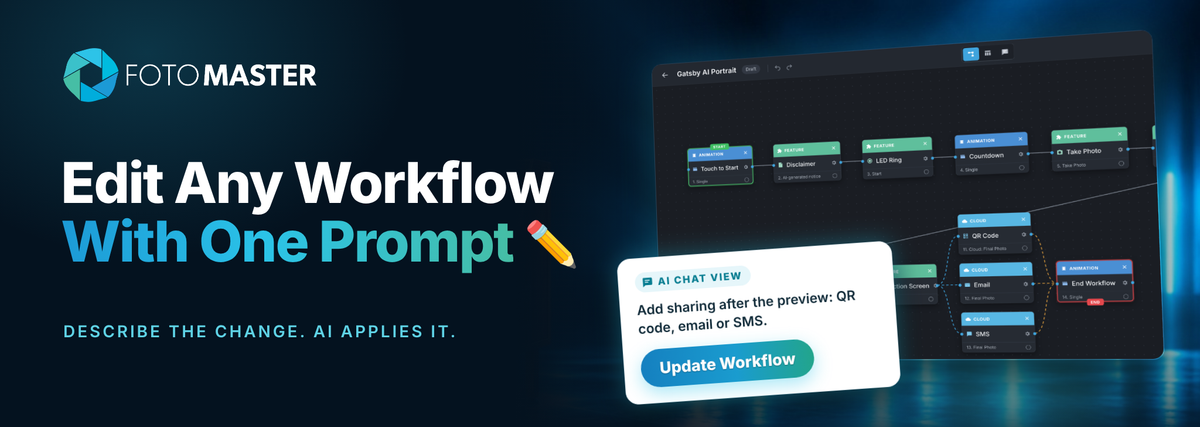
Most events don't need a workflow built from zero. They need a template that is almost right, plus a few changes for this client. Now you can make those changes with one prompt, then click Update Workflow.
"Add sharing after the preview. Let guests choose QR code, email or SMS."
✓ Adds a Selection Screen with QR Code, Email and SMS
"Add a disclaimer before the photo that results are AI-generated."
✓ Inserts a Disclaimer right after Touch to Start
"Remove SMS. Guests only need QR code and email."
✓ Removes the step and reconnects the flow
"Add a second photo with a countdown before it."
✓ Adds the new steps where they belong
The AI changes only what you asked for. The rest of your workflow stays as it was.

Smarter
🧠 It knows where each step belongs.
The AI understands requests much better than before. Ask for a disclaimer before the photo, and it lands right after Touch to Start, not at the end of the flow.
You can also ask it to review a workflow and improve it, for example: "Make this flow smoother for guests."

Control
🧩 You stay in control.
Every AI change lands in the same workflow you already work with. Check it in Node view, scan it in List view, change any step by hand, or ask the AI for something different. When it looks right, click Save Workflow and sync it to your booths.
Who it's for
👥 Built for busy event businesses.
How to get it
☁️ Available in Foto Master Cloud.
The AI Workflow Builder lives in Foto Master Cloud, and the workflows it creates sync to FMX on your booths.

FMX for Windows
For booths running on a Windows computer, from mirror booths to custom builds.