FMX 2 Is Here: More Ways to Build, Sell and Run Photo Booth Experiences
FMX 2 is here. 🎉
This release gives photo booth owners more ways to create experiences guests haven't seen before, more ways to turn those experiences into products you can sell, and more freedom in how and where you run them with FMX photo booth software.
FMX is Foto Master's software for building interactive photo, video, AI, and event experiences across a wide range of photo booth setups.
Available now, and upgrading is free for every FMX user.
Here's what you can do with it. 👇
📖 Turn Video Into a Flipbook
AI video results usually end on a screen. Now they can end up in your guests' hands.
FMX 2 introduces AI Flipbooks. A guest is transformed by AI, that result becomes a short animated video through AI Image-to-Video, and FMX turns those frames into a physical flipbook they can hold and flip through.

And it isn't limited to AI. Record a short clip or use a finished video output, and FMX can turn that into a flipbook too.
FMX handles the production side too: frame grids, cutting-space padding, page order, frame numbering, and an option to print the last page first for easier assembly.

This one goes back to Foto Master's roots.
More than 15 years ago, one of our first products was VideoFlip, software that turned video into physical flipbooks. Now flipbooks are back, rebuilt inside FMX.
💡 Why it matters: video and AI video no longer have to end on a screen. You can turn them into a physical product guests keep.
🌈 Create Lenticular Prints Inside Your Workflow
A lenticular print combines two or three images into one physical print that changes as you tilt it.
That also makes it a natural fit for AI transformations.
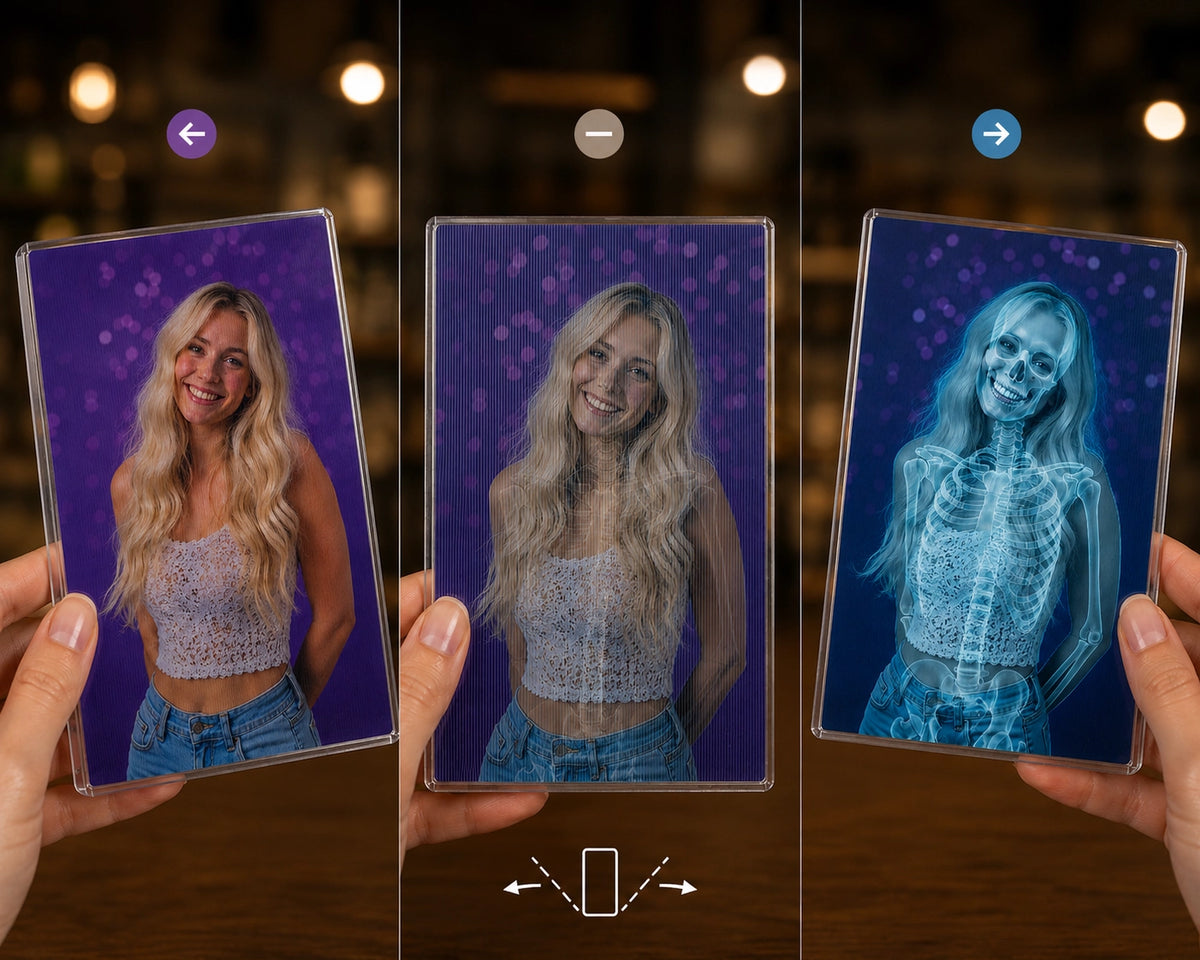
Guests preview the transformation on the booth before it prints:

FMX 2 creates the lenticular image directly inside the workflow, with the controls needed to prepare it for production: lens pitch, alignment, orientation, printer profiles and calibration. There's also precision support for compatible DNP RX1 and RX1HS workflows.
Lenticular output also requires lenticular lens sheets and compatible print media.

💡 Why it matters: one capture becomes a physical, interactive product, with the transformation built into the print itself.
✋ Let Guests Build Their Final Photo
A photo booth has always decided the guest's photo for them. It captures, drops the images into the layout in the order they happened, and prints.
FMX 2 can hand that choice to the guest.
Drag-and-drop photo layouts
Guests place their captured photos into layout placeholders themselves, using a natural touch interface. They choose which photos make the print, and where each one goes.

Take 5 and print 3. Run several AI transformations and let them pick a favorite. Combine raw photos and AI results in the same layout.
Expanded photo selection
Guests can choose between completed layouts and individual raw photos.
Layout-aware preview filters
Creative filters can be applied to photos inside the layout, and whatever the guest picks carries through to the final output.
💡 Why it matters: you control the layout and the experience. Guests get more control over the result they actually take home.
🤖 Run Multiple AI Transformations in One Step
You can now use multiple AI processing services from a single AI Processing step. One capture can produce several transformations, without building a separate AI step for each result.
Pair it with drag-and-drop and you can build experiences where guests generate several versions of themselves, see them together, and decide which result makes the final composition.

Example: let guests pick their favorite AI result, using different AI models.
💡 Why it matters: more AI options for the guest, with a simpler workflow for you to build and maintain.
📺 Put Your Booth Screen to Work
Your booth is already creating content all night. Slideshow mode puts it to use.
FMX 2 can start and stop a live slideshow of event results wherever you choose in the workflow, and you control the timing, transitions and presentation.

During AI processing
This is the best place for it. AI generation takes a few seconds, and until now those seconds were a loading screen. Now guests spend them watching results from earlier in the event while their own is being created.
The wait feels shorter, and guests get to see what other people made, which usually makes them more excited about their own.
On Touch to Start, and between sessions
Instead of a static welcome screen, the booth shows off. Anyone walking past sees exactly what your booth is producing tonight, which is the best advertising you have at the event itself.
💡 Why it matters: the booth screen keeps working even when nobody is taking a photo, and dead waiting time becomes part of the show.
How this differs from FMSlide
If you already use FMSlide, our free app for Foto Master Cloud users, this is not a replacement. FMSlide is cloud-based and displays all of your event media on any external monitor, anywhere at the venue.
FMX Slideshow runs directly on the booth and becomes part of the workflow itself.
Use FMSlide across the room and FMX Slideshow on the booth.
📷 Native GoPro Support
FMX 2 adds native support for compatible GoPro cameras over USB. Use a GoPro for photos, video recording, media download and live preview, running the same kind of FMX workflow you would with any other supported camera.
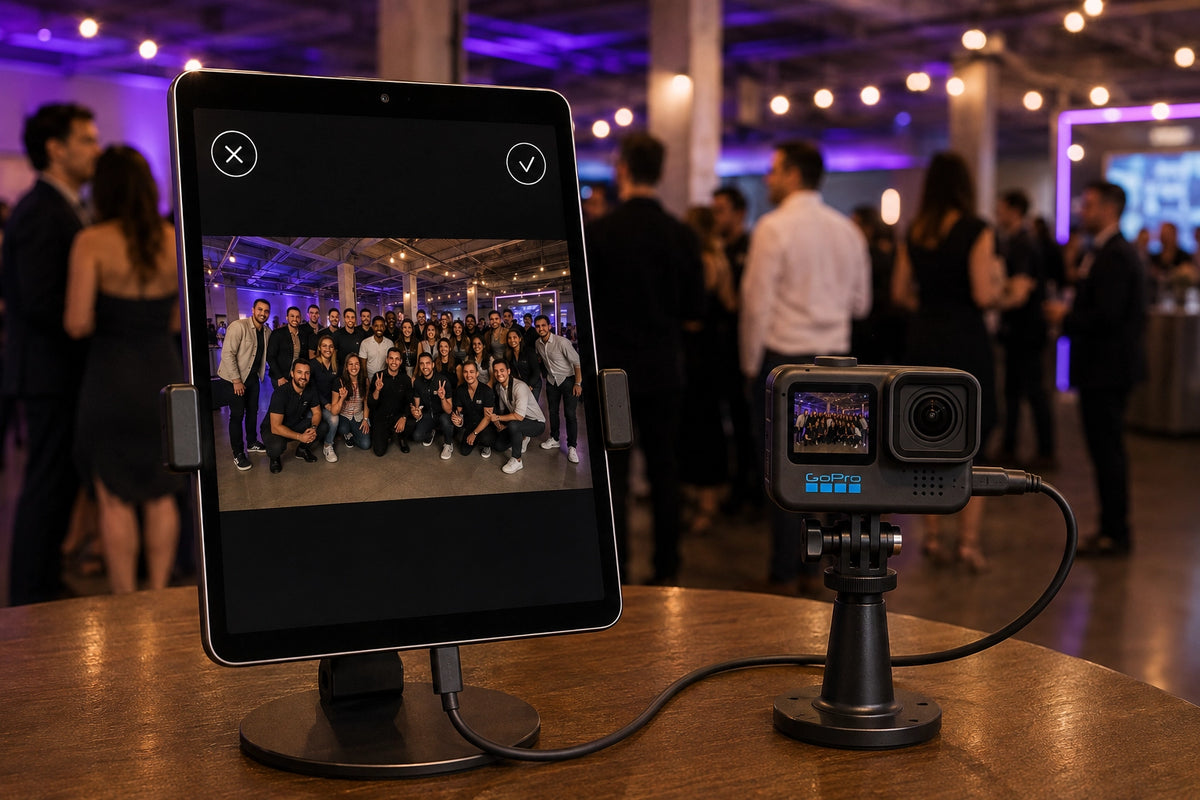
You can configure compatible lenses, resolutions, frame rates, HDR and Log profiles, HyperSmooth stabilization and video framing. FMX also displays connection, model, firmware, battery and storage information.
But the interesting part is what happens to the physical setup. A smaller, ultra-wide camera gives you more freedom to build around it: compact installations, unusual mounting positions, wide group experiences, and custom builds where a traditional camera would take up too much space.
Including 360 experiences
A GoPro's size, weight and ultra-wide lens make it a natural fit for spin platforms and 360 setups. With FMX 2, those experiences can run inside the same workflows you already build, with the same AI, layouts, sharing and outputs.
💡 Why it matters: your camera no longer has to dictate the shape of the experience.
📸 Turn the DSLR Shutter Into the Start Button
Not every FMX experience needs a guest standing in front of a touchscreen.
With compatible Canon cameras, pressing the physical shutter button can now trigger the FMX workflow.

This opens the door to roaming setups.
No booth, no start screen, no Touch to Start. A photographer moves through the event, takes a photo, and that capture immediately launches whatever comes next: an AI transformation, a sharing screen, a branded output, or any custom flow you've built.
The photographer decides when a session begins, not the guest. Which means you can now run a full FMX experience at a cocktail hour, on a red carpet, across a conference floor, or anywhere a booth was never going to fit.
💡 Why it matters: the workflow follows the photographer around the event, instead of every experience having to begin at the booth.
💳 Charge Different Prices for Different Experiences
FMX could already take payments. FMX 2 makes it much easier to price the experience itself.
The new Payment Selection Screen shows several experiences on one screen, each with its own price. For example:
- Regular Photo: $1
- AI Photo: $3
- AI Video: $5
The guest chooses what they want, the payment QR updates for that selection, and once payment completes FMX sends them into the right experience. Stripe and Shopify flows both get an updated QR checkout presentation, with a clear branded loading state while the code is prepared.

Those prices are only an example. Payment Selection Screens are built in the Workflow Builder, under the Selection Screen feature. Upload your own background and area media, arrange the options however you want, and set whatever price fits each one.
💡 Why it matters: you can build a self-service menu of paid experiences, branded however you like, without maintaining a separate workflow for every price point.
🔗 Webhooks: Connect FMX to the Rest of Your Business
This is the one a lot of you have been asking for.
FMX 2 adds a Webhook workflow step. Place it anywhere in a workflow and FMX can send session information, guest data, survey answers, media and custom fields to a compatible external service, in real time, while the event is running.
It also works in both directions. Anything the service sends back can be reused later in the same workflow, so an external system can influence what happens next on the booth.
Media can be delivered as hosted URLs or as Base64 data, depending on what the receiving service expects.
That opens up direct connections with:
- CRMs and lead capture systems
- Client marketing platforms
- Custom galleries and delivery systems
- Internal dashboards and reporting tools
- Anything else with a compatible endpoint
For operators running branded activations, this is often the difference between winning the job and losing it. When a client asks whether their leads can land in their own system as guests are captured, the answer is now yes.
*Webhooks are available on Foto Master Cloud Pro plans.
💡 Why it matters: no more exporting data after the event. FMX can hand it straight to whatever your client already uses, while the booth is still running.
⚙️ More Control in the Workflow Builder
FMX 2 also expands what the Workflow Builder can do behind the scenes.
Mixed Selection Screens
Put workflow choices and action choices on the same selection screen.
End Session
Choose exactly where one guest session ends and the next begins.
Better workflow navigation
Parent and child workflows now return guests to the intended screen more reliably.
FMX 2 also adds built-in transparent animations, individual selected states for interactive areas, and dynamic filenames for custom QR destinations.
💡 Why it matters: you don't need any of this to build a standard photo booth workflow. It's there when a client asks for something custom.
🟩 More Camera Control + Live Green Screen
FMX 2 expands camera controls, including additional supported settings such as white balance and white-balance shift.
Green and blue screen workflows get more control too. Chroma keying can now be applied to live view, captured photos and recorded video, with configurable backgrounds and tuning controls.

💡 Why it matters: guests see the keyed scene before the capture, and the same setup carries through photo and video output.
👆 A Guest Interface Built for Touch
FMX 2 gives the guest-facing interface a major touch-focused update, with larger controls, clearer selected states and easier navigation on unattended screens.
Buttons have clearer pressed and selected states, and text and icons adapt automatically to the theme color you choose.
Sign & Draw has been redesigned to make signatures, drawings and stamps easier on a touchscreen.
Drag-and-drop gets the same treatment, with thumbnails and the Next action positioned for easier reach.
Surveys now include a Back option where the workflow allows it, plus an uppercase and lowercase toggle on the on-screen keyboard.
💡 Why it matters: guests understand what to tap without an attendant explaining the screen.
🛠️ Easier to Run at a Live Event
Some of the most useful FMX 2 changes are the ones you hopefully won't notice during an event.
Running unattended
Booth Closed can now reopen automatically, so a booth that pauses between sessions doesn't need someone standing next to it. You can also replace the standard Booth Closed screen with your own branded animation.
Fewer small frustrations
FMX shows your connected Foto Master account in Global Settings, remembers your login preference and supports saved credentials, and links directly to the Knowledge Base and Feedback Center. Cloud requirements now appear as clear in-app messages, and authentication, email and API errors are written in plain language instead of raw technical responses.
💡 Why it matters: fewer things to explain to guests, and fewer things to solve on your own mid-event.
📜 The Full Change Log
Every change in FMX 2, including the smaller ones:
New products and experiences
- ✅ Flipbooks from recorded, finished or AI-generated video
- ✅ Full flipbook production controls: frame grids, cutting-space padding, page order, frame numbering, Print Last Page First
- ✅ Lenticular prints from two or three photos, created inside the workflow
- ✅ Professional lenticular calibration, with precision support for DNP RX1 and RX1HS
- ✅ Drag-and-drop photo layouts
- ✅ Guest choice between completed layouts and individual raw photos
- ✅ Layout-aware preview filters
- ✅ Slideshow mode, startable and stoppable anywhere in the workflow
- ✅ Multiple AI services from a single AI Processing step
- ✅ Built-in transparent animation, no custom media file needed
Cameras and capture
- ✅ Native GoPro support over USB: photos, video, media download, live preview
- ✅ GoPro lens, resolution, frame rate, HDR, Log, HyperSmooth and framing controls
- ✅ GoPro connection, model, firmware, battery and storage monitoring
- ✅ Physical DSLR shutter as the guest capture action, on compatible Canon cameras
- ✅ Expanded camera controls including white balance and white-balance shift
- ✅ Chroma keying on live view, captured photos and recorded video
Workflows, payments and data
- ✅ Webhook workflow step for session data, guest data, survey answers, media and custom fields (Cloud Pro)
- ✅ Webhook media as hosted URLs or Base64
- ✅ Webhook response variables, reusable later in the same workflow
- ✅ End Session step
- ✅ Mixed Selection Screens combining workflow and action choices
- ✅ Payment Selection Screens with per-option pricing and routing
- ✅ Branded QR loading experience for Stripe and Shopify checkout
- ✅ Multi-area selection effects with individual selected states
- ✅ Improved parent and child workflow navigation
- ✅ Dynamic QR filenames, including AI Photo outputs
- ✅ Updated workflow definitions for more consistent nodes, connections, branching and navigation between FMX and the Workflow Builder
Guest interface
- ✅ Larger buttons, keyboards and controls for unattended touchscreens
- ✅ Clearer pressed and selected states
- ✅ Button text and icons that adapt to your theme color
- ✅ Redesigned Sign & Draw
- ✅ Improved drag-and-drop navigation and thumbnail placement
- ✅ Survey Back button
- ✅ Uppercase and lowercase toggle on the survey keyboard
- ✅ Strip-print numbering control for even-frame workflows
- ✅ Booth Closed auto-resume
- ✅ Custom Booth Closed animation
Operations and support
- ✅ Integrated ScreenSteer remote support
- ✅ Connected Foto Master account visible in Global Settings
- ✅ Credential autofill and remembered login preference
- ✅ Direct links to the Knowledge Base and Feedback Center
- ✅ Clearer in-app cloud-sync guidance
- ✅ Readable error messages for authentication, email validation and API failures
- ✅ Fixed the clipped Completed badge
- ✅ Fixed photo capture when a Take Photo step overrides the camera configuration
- ✅ All maintenance work from the V1.0.351 line
🚀 FMX 2 Is Available Now
FMX 2 is available now for FMX for Windows & iPad, and it's a free update for every FMX user.
🖥️ Windows users: Head to Foto Master Cloud → Licenses to download the latest version.
📱 iPad users: Update your FMX app directly from the App Store.
New to Foto Master? Explore FMX →