Industry First: Build Photo Booth Workflows with AI
We changed the game when we launched FMX with a powerful Visual Workflow Editor. It gave you total control to customize every step of the guest journey.
But we didn’t stop there. We wanted to make getting started faster than ever before.
Introducing your new co-pilot for workflow creation.

🤖 What Is the AI Workflow Generator?
The AI Workflow Generator is an optional AI-powered chat mode inside the FMX Workflow Builder.
Instead of starting from a blank canvas or manually placing nodes/steps one by one, you can simply describe the experience you want, and the AI builds the workflow for you.
It instantly generates:
✅ The full logic flow
✅ All required steps and screens
✅ Matching animations and features
✅ A ready-to-use workflow you can immediately run or customize further.
⚙️ Why Use AI?
You might be asking: "Don't you already have templates?" 🤔
Yes! The Cloud is packed with Pre-Made Templates for common events. If you need a standard setup, loading / duplicating a workflow template is a perfect way to start.
But the AI is for when you have a unique vision.
What if a client asks for a complex, never-been-done activation? Instead of stressing over how to build the logic manually, just ask FMX to build it. It allows you to create custom, high-value experiences instantly without the manual setup.
⚠️ Important to Know:
The AI Workflow Builder is an assistant tool. It creates a strong starting point, but every workflow should be reviewed and tested before going live.
Like any AI system, the results depend on how clearly the prompt is written. In most cases, the AI builds exactly what you ask. Sometimes small refinements are needed to match your vision perfectly.
Instead of building everything manually, you start with a nearly complete structure and fine-tune from there. That alone can reduce setup time by over 90%.
You stay in control. The AI gives you the head start.
💬 Real-World Prompt Examples
You don't need to be a "prompt engineer" or know any code. Just describe your vision in plain English. Here are two examples of what you can type to get results instantly:
1. Quick "Time-Saver":
"Create a classic glam Wedding workflow. Take 3 photos, apply a black and white glam filter, and finish with printing."
2. Complex Prompts:
"Create a ‘Future Self’ photo experience. Show a Disclaimer explaining that results are AI-generated and for entertainment purposes only. Then, ask the guest to type their ‘Dream Job’ into a survey. Take 1 photo, then use AI to transform their outfit and background to match that specific job title.
Show a Preview with a Retake option. Finish with a Share screen where guests can choose QR code, Email, or SMS. Add engaging animations between each step."
🧩 Your Workflow, Your Way: 3 Ways to Create in FMX
Inside the FMX Workflow Builder, you can seamlessly switch between three powerful modes:
-
Visual Node View
Ready to visualize your logic? The Node Builder takes the "invisible" connections of the past and makes them visible.
• See exactly where your workflow branches.
• Drag and drop logic connections.
• Visualize the entire guest journey on an infinite canvas.
It’s the most advanced way to build, giving you total control over complex loops, conditions, and multi-experience events.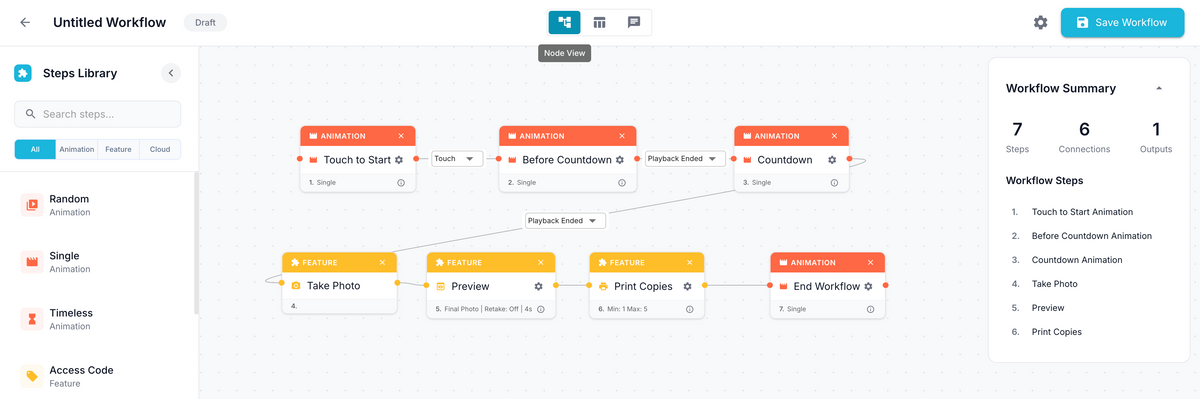
-
List Mode
For those who loved the workflow style of our previous software versions, List Mode is your home. It’s a linear, top-to-bottom view of your event sequence. It’s familiar, fast, and perfect for straightforward activations where you want to see a clear checklist of steps.
-
AI Workflow Generator
Skip the manual setup entirely. Instead of starting from scratch, simply describe exactly what you want, and in seconds, the AI builds the entire structure for you. You get a custom-built workflow instantly, which you can then tweak in Node or List view.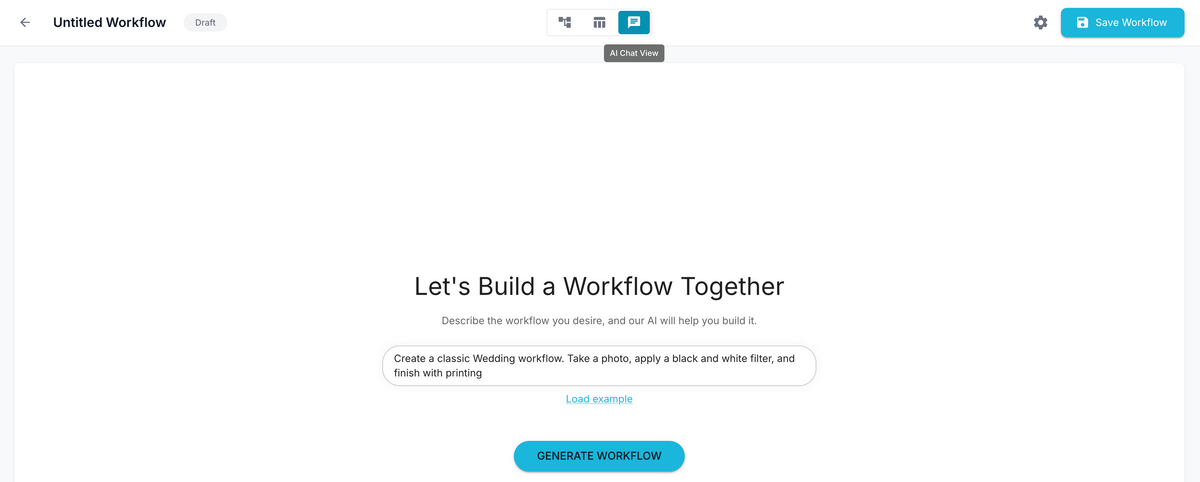

The best part? They are all connected. You can generate a complex workflow using AI, switch to Node View to tweak the logic visually, and then check the List View for a quick summary. You are never locked in. The AI gives you the head start; you stay in control.
🚀 Start Creating Without Friction
The AI Workflow Generator isn't just a cool feature, it's a real business advantage that no one else has.
It means you can say "Yes" to complex client requests with confidence, knowing the AI can help you handle the logic. It means spending less time on technical setup and more time on your business.
The AI Workflow Generator is available now in Foto Master Cloud, exclusively for FMX users.
Log in, open the builder, and try your first prompt today! ✨